Bill of supply format in Excel, Word and PDF
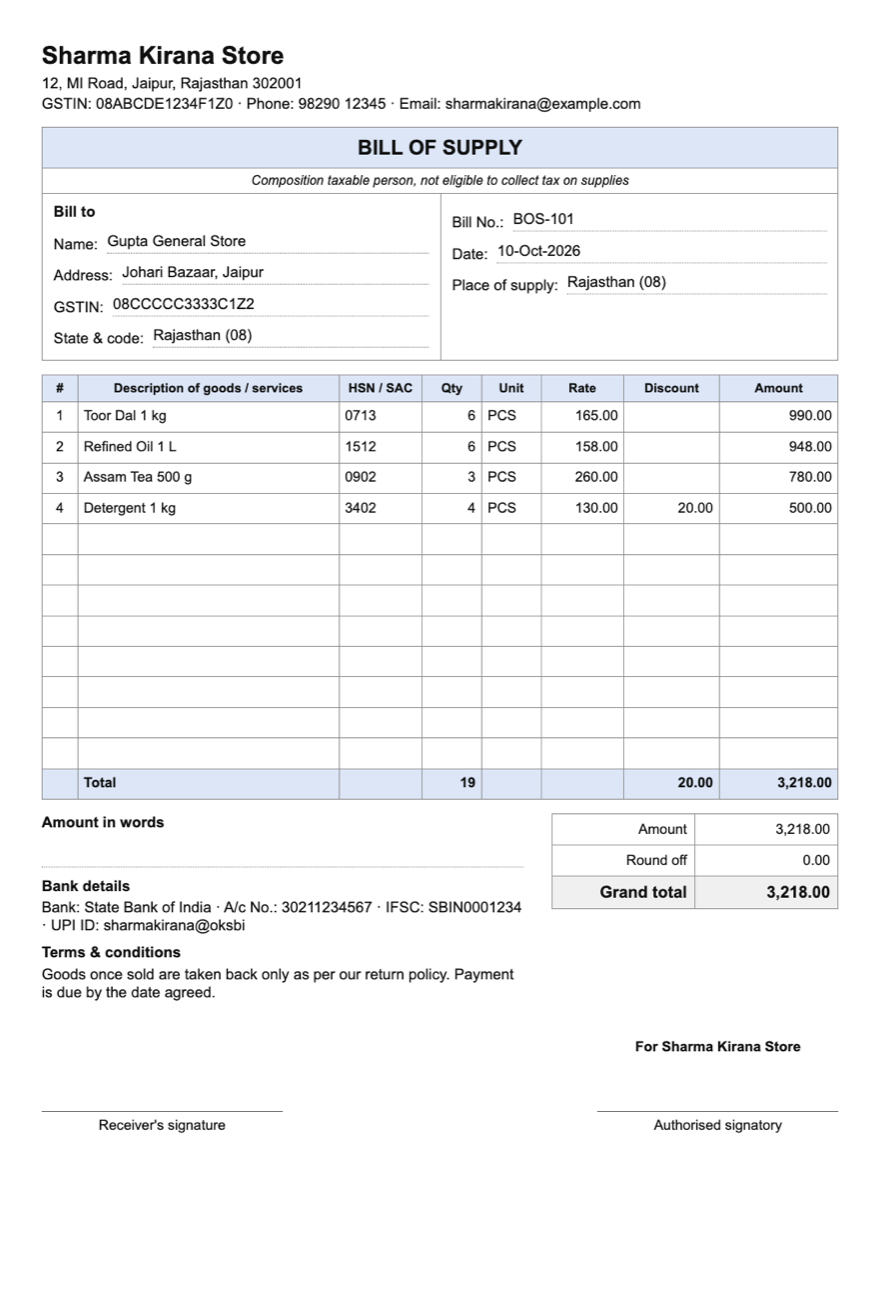
A bill of supply is the bill a composition dealer gives, and the bill for goods or services that carry no GST. It shows no tax. Download a ready format, or read what it has to contain.
Free to download and use. Hindi + English version
Last updated: 10 October 2026
When to use a bill of supply
- You are under the composition scheme. You cannot charge GST to your customer, so every sale goes on a bill of supply.
- What you sell is exempt. Goods or services that carry no GST go on a bill of supply even when you are a regular dealer.
- A sale has both taxable and exempt items for an unregistered customer: one invoice-cum-bill of supply can cover both.
For a taxable sale by a regular dealer, use a tax invoice.
What a bill of supply must contain
Rule 49 of the CGST Rules lists the details:
- Your name, address and GSTIN.
- Bill number: consecutive, up to 16 characters, unique within the financial year.
- Date of issue.
- The customer's name, address and GSTIN (or UIN), when the customer is registered.
- HSN code for goods, or the SAC for services.
- Description of the goods or services.
- Value of the supply, after any discount.
- Signature or digital signature of the supplier or an authorised person.
A composition dealer also writes "composition taxable person, not eligible to collect tax on supplies" at the top. The format has the line in place; remove it if you issue the bill for exempt goods instead.
What is in the download
- Excel: each line's amount, the total and the round-off work themselves out. A second sheet explains how to fill it.
- Word: the same layout, to edit in Word or Google Docs.
- PDF: a blank A4 form to print and fill by hand, like a bill book page.
How to fill the Excel format
Type over the brackets
Put your business name, address, GSTIN and bank details where the format says [Your business name] and so on.
Fill the white cells
Replace the example lines with your own items. One line per item: quantity, rate and discount.
Leave the grey cells alone
They are worked out for you, and so are the totals. Print on A4 or save as PDF.
Or let SahiBill make it
In SahiBill, choose Composition under Taxes and GST in Settings, and every sale prints as a bill of supply with the declaration, your details and the right numbering. Stock and each customer's balance update with the same bill, and GSTR-4 figures add up for your CA.
This page is a plain-language summary, not tax or legal advice, and the rules change. Read the GST Council's note on tax invoices and other documents and the current rules on the CBIC website, or ask your CA. SahiBill is an independent app and not a government app.
Bill of supply questions
Can a composition dealer charge GST on the bill?
No. A composition dealer pays tax on turnover and cannot collect GST from customers, so the bill of supply shows no tax.
Can my customer claim input tax credit on a bill of supply?
No. There is no tax on a bill of supply, so there is nothing to claim.
Does a bill of supply need an HSN code?
The rule lists the HSN code (SAC for services) among the details. How many digits you need depends on your turnover; see the GST invoice format guide.
Do I need a bill of supply for a small sale?
For a sale under ₹200 to an unregistered customer who does not ask for a bill, one consolidated bill of supply for the day is allowed.
What is the difference between a bill of supply and a tax invoice?
A tax invoice shows GST and lets a registered customer claim credit. A bill of supply shows only the value.
Related
Bills of supply without the typing
SahiBill prints them from your items and keeps stock and balances right. No ads. Works without internet.