Quotation format in Excel, Word and PDF
A quotation tells a customer what the job or the goods will cost before they say yes. Download a ready format with GST shown line by line, or read what a good one contains.
Free to download and use. Hindi + English version
Last updated: 10 October 2026
What a good quotation contains
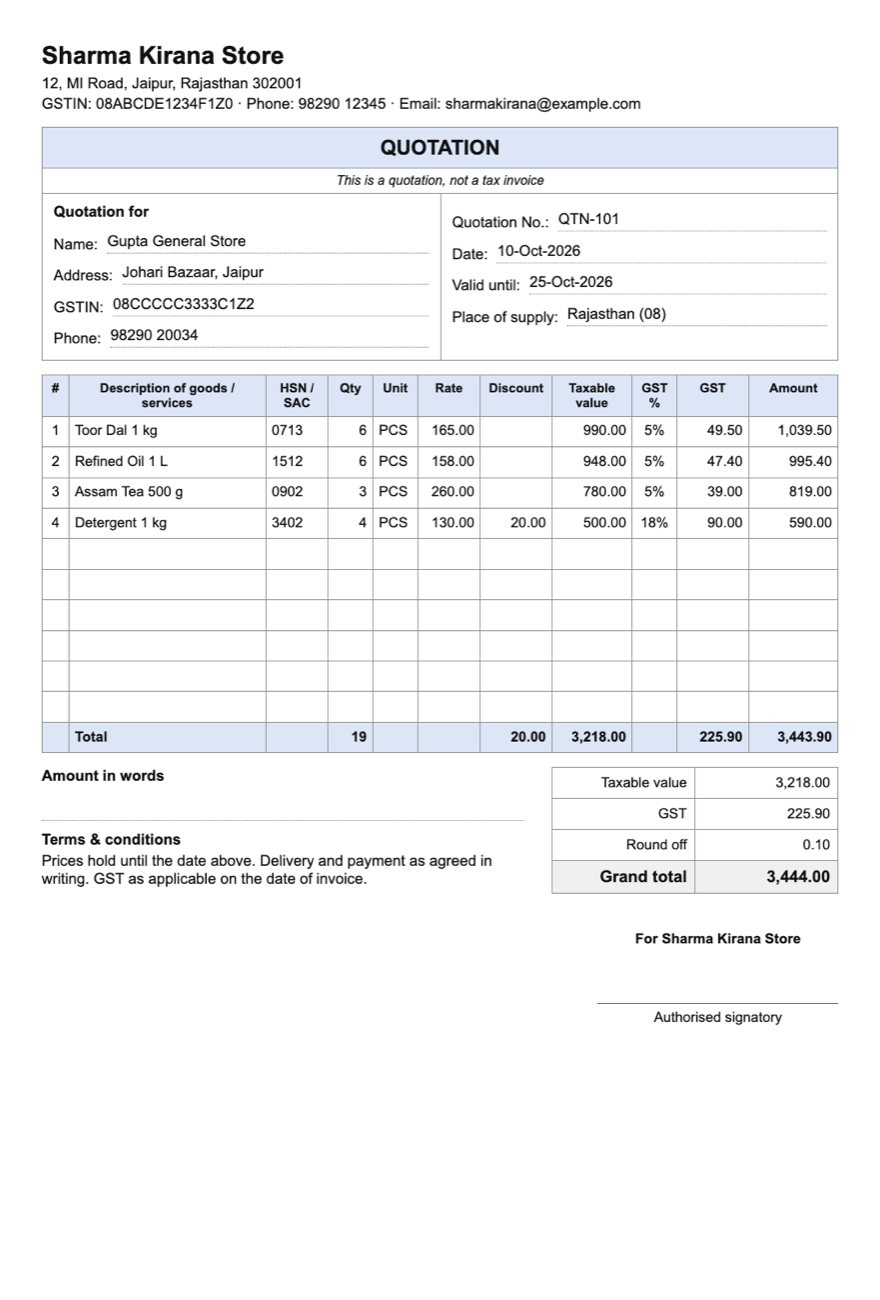
GST law does not prescribe a quotation, so there is no fixed list. These details save the questions that come back otherwise:
- Your name, address, GSTIN and phone.
- Quotation number and date, so both sides can refer to it.
- Valid until: the date after which your prices may change.
- The customer's name and address, and GSTIN if they have one.
- Each item with its description, HSN or SAC code, quantity, unit and rate.
- Discount, if you are offering one.
- GST rate and amount, shown apart from the price, so the customer sees what they will actually pay.
- Total, and the terms: delivery time, payment, anything not included.
Quotation, estimate or proforma invoice?
| Document | What it says |
|---|---|
| Quotation | A firm price for a stated quantity, valid until a date. |
| Estimate | An approximate price, when the final work or quantity is not yet known. |
| Proforma invoice | The invoice as it will look, sent before the supply, often so the customer can pay in advance. |
None of the three is a tax invoice. GST is charged, and credit is claimed, on the tax invoice you issue when you supply.
What is in the download
- Excel: taxable value, GST and the total work themselves out from quantity, rate, discount and GST %. A second sheet explains how to fill it.
- Word: the same layout, to edit in Word or Google Docs.
- PDF: a blank A4 form to print and fill by hand.
How to fill the Excel format
Type over the brackets
Put your business name, address, GSTIN and bank details where the format says [Your business name] and so on.
Fill the white cells
Replace the example lines with your own items. One line per item: quantity, rate and discount.
Leave the grey cells alone
They are worked out for you, and so are the totals. Print on A4 or save as PDF.
Or let SahiBill make it
In SahiBill, an estimate takes the same few taps as a bill: pick the customer and the items, and share the PDF on WhatsApp. When the customer agrees, turn the estimate into an invoice with one tap, so nothing is typed twice and your stock moves only when you sell.
This page is a plain-language summary, not tax or legal advice, and the rules change. Read the GST Council's note on tax invoices and other documents and the current rules on the CBIC website, or ask your CA. SahiBill is an independent app and not a government app.
Quotation questions
Is a quotation a GST document?
No. GST rules cover the tax invoice, bill of supply, delivery challan and vouchers, not quotations. A quotation is a business offer.
Should a quotation show GST?
It is good practice. Showing the GST rate and amount beside the price avoids a dispute over whether the price included tax.
How long is a quotation valid?
As long as you say. Write a "valid until" date; after it, you are free to change the price.
Can I turn a quotation into an invoice?
In SahiBill, yes: open the estimate and convert it. In Excel or Word, copy the lines into the GST invoice format.
Does a quotation reduce my stock?
No. Stock moves when you sell, not when you quote.
Related
From quotation to invoice in one tap
SahiBill keeps your estimates, orders and invoices together. No ads. Works without internet.